![muso-logo-rgb.png]](https://supporthub.muso.com/hs-fs/hubfs/muso-logo-rgb.png?height=40&name=muso-logo-rgb.png)
What is a Non-Compliant Site?
A non-compliant site is a domain that fails to take action upon receiving a DMCA takedown notice. This means they will not remove infringing content from their site when notified of its presence.
How MUSO Handles Infringements on Non-Compliant Sites
Infringements from these domains are tracked within the MUSO Protect Dashboard. This ensures:
- An audit trail of enforcement efforts.
- Support for potential legal actions.
- Greater transparency and insight into your overall compliance activity.
How They Appear in the Dashboard
-
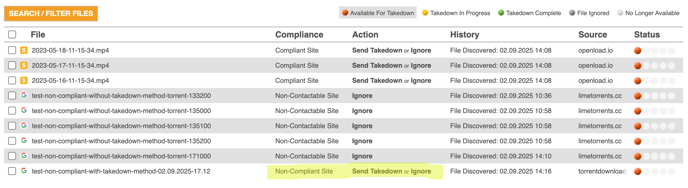
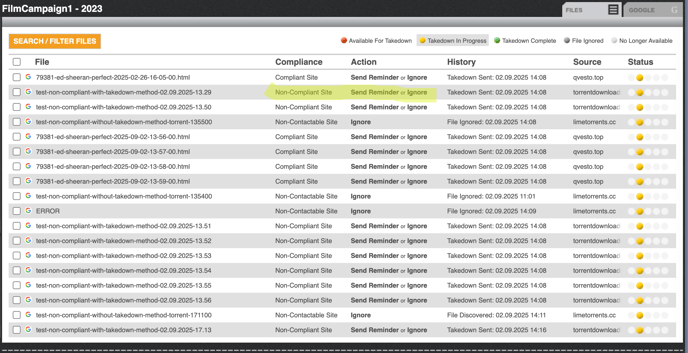
Infringements will display in the Compliance column as Non-Compliant Site.
-
They may appear under Files – Available for Takedown or Files – Takedown In Progress (see screenshots below).
Files - Available For Takedown
Files - Takedown In Progress
Actions You Can Take
-
Send Takedown or Send Reminder.
-
You can also choose to Ignore the infringement, which will move it to the File Ignored tab.
Notes:
- Google delistings for non-compliant sites can also be found in the Google tab. MUSO automatically submits a delisting request for any infringements we detect. A Google delisting removes infringing pages from search results, making them significantly harder for users to access.
- Infringements marked as 'In Progress' will remain in that status if the site fails to act on a DMCA takedown notice.
- Filtering by compliance type is not yet available.
- Some areas of the dashboard, such as CSV exports and PDF summaries, currently do not include non-compliant domains.